
Updates
From version 0.3.5, S7 PLC Buddy updates itself. You do not have to download and run an installer again.
How it works
Section titled “How it works”-
About 20 seconds after the app starts, and then every 6 hours while it runs, the app asks the update server whether a newer version exists.
-
If there is one, it downloads it in the background. Only the parts that changed are downloaded, so an update is usually small. You can keep working.
-
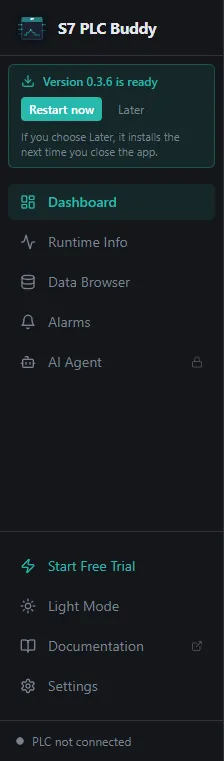
When the download is complete, a box appears at the top of the left sidebar: “Version X is ready”, with two buttons:
- Restart now closes the app, installs the update, and starts the new version by itself. This takes under a minute. Your settings, license, and conversations are kept.
- Later hides the box. The update is then installed the next time you close the app.
-
Restart now is greyed out while the AI Agent is answering, so an update never interrupts a long task. It becomes available when the answer is complete.
Controls
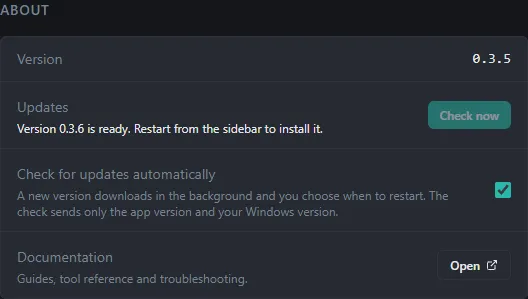
Section titled “Controls”In Settings → System → About:
| Element | What it does |
|---|---|
| Updates | Shows the state: “You have the latest version”, “Downloading X…”, or “Version X is ready” |
| Check now | Looks for an update immediately |
| Check for updates automatically | A switch. When it is off, the app never looks by itself; Check now still works |
What is checked before an update is installed
Section titled “What is checked before an update is installed”An update is installed only if it passes two checks:
- Integrity: the downloaded file must match the fingerprint (hash) published with it.
- Publisher: the installer must be digitally signed by the same publisher as the app. An unsigned installer, or one signed by anyone else, is refused and nothing is installed.
What the check sends
Section titled “What the check sends”A check is an ordinary web request for a small file. It carries the usual details of such a request (the app and Windows versions in the user agent) and no license key or machine ID.
If the check fails
Section titled “If the check fails”If the PC is offline, behind a proxy that blocks the request, or the update server is not reachable, the app ignores the problem and tries again later. Check now shows an error if it fails. You can always install a new version by hand from the website.
Where the files are
Section titled “Where the files are”The downloaded update is kept in %LOCALAPPDATA%\s7-plc-buddy-updater. It can use about 250 MB; it is what lets the next update download only what changed. Deleting the folder is safe, the next update may then be a bigger download.